Latest: Download Free Desktop Wallpapers of Chef Loony! | Series: AuthorRank? | Download MBT eBooks!

Create a Windows e-mail shortcut

0 comments

Create a Windows e-mail shortcut

If you have a friend, family member, or co-work that you often e-mail creating an e-mail shortcut link on your Desktop or Taskbar can be a quick and easy way to e-mail them. To create an e-mail shortcut follow the below steps.
1. Right-click the Desktop or area you want to create the e-mail shortcut and select New and then Shortcut.
2. For the location or path to the shortcut enter mailto:friend@example.com where friend@example.com is the e-mail address you want to use in the shortcut.
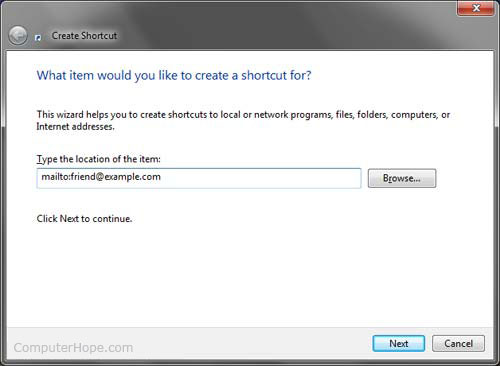
Email Windows shortcut
3. Click Next and then type the name of the Shortcut and click Finish.
Now when this shortcut is clicked a new e-mail window will appear with that e-mail address already typed into the To field.
Tip: If you're running Microsoft Windows 7, you can also pin this shortcut to your Taskbar. If you already have your e-mail client pinned on the Taskbar right-clicking that icon will show your new pinned shortcut.

No comments:

ctika

adserum 2

adserum 1

  • MBT Icons and buttons

    Icons and Buttons

    Our resources have been successfully downloaded over 10K times and found almost every where. Get yours!

  • choosing webhost for a blog

    Why HostGator?

    Learn Why we chose HostGator as our Web Host and find discount coupons to kick start your blog today!

  • SEO Settings for blogger

    ALL IN ONE SEO PACK 2012

    Learn every single SEO tip that will boost your blog's ranking and organic traffic. We got them all!

  • Blogger widgets and plugins

    Visit MBT's Blogger LAB

    Why not take a tour of all great Blogger widgets published so far? You Name it we have it!

  • become a six figure blogger!

    Become a SIX FIGURE BLOGGER

    Learn what it takes to become a successful entrepreneur and build a living online!